Home > Dev. Kit > Development Kit for 13.3-inch E6 Series Color Display QSPI Driver Board
National Day Big Sale

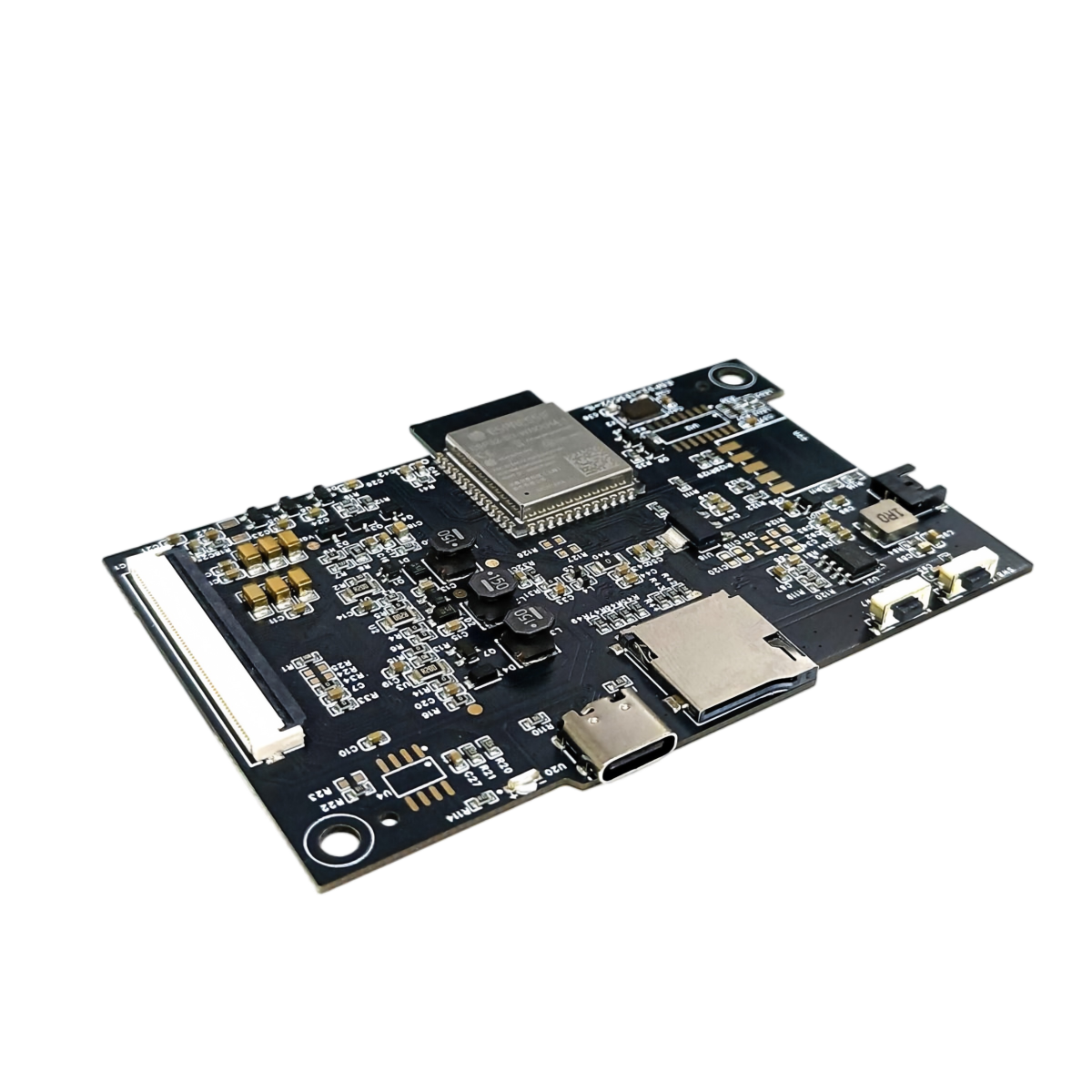
Development Kit for 13.3" 7.09-inch E6 Series Color Display QSPI Driver Board, ESP32-133C02-IL

$42.42 $49.90
15% OFF
The 13.3" 7.09-inch E Ink Spectra 6 color e-paper display driver board ESP32-133C02-IL is specially developed for the E6 color display.
GET $3.00 OFF ON ORDERS OVER $59.00
Get it
ERP72QDC
Received successfully
Coupon Code
CONTINUE SHOPPING
Discount
  • 3% OFF WITH PURCHASE OVER 2 UNITS
  • 5% OFF WITH PURCHASE OVER 3 UNITS
    Please select the information you want X
  • product:
    Wifi Driver Board Only
    with WIFI Version Board
    with SD Card Version Board
    Please select the information you wantX
Quantity:
0 in stock
  • Development Kit for 13.3" 7.09-inch E6 Series Color Display QSPI Driver Board, ESP32-133C02-IL
  • Development Kit for 13.3" 7.09-inch E6 Series Color Display QSPI Driver Board, ESP32-133C02-IL
  • Development Kit for 13.3" 7.09-inch E6 Series Color Display QSPI Driver Board, ESP32-133C02-IL
  • Development Kit for 13.3" 7.09-inch E6 Series Color Display QSPI Driver Board, ESP32-133C02-IL
  • Development Kit for 13.3" 7.09-inch E6 Series Color Display QSPI Driver Board, ESP32-133C02-IL
  • Development Kit for 13.3" 7.09-inch E6 Series Color Display QSPI Driver Board, ESP32-133C02-IL
  • Development Kit for 13.3" 7.09-inch E6 Series Color Display QSPI Driver Board, ESP32-133C02-IL
  • Development Kit for 13.3" 7.09-inch E6 Series Color Display QSPI Driver Board, ESP32-133C02-IL
  • Development Kit for 13.3" 7.09-inch E6 Series Color Display QSPI Driver Board, ESP32-133C02-IL
  • Development Kit for 13.3" 7.09-inch E6 Series Color Display QSPI Driver Board, ESP32-133C02-IL
  • Development Kit for 13.3" 7.09-inch E6 Series Color Display QSPI Driver Board, ESP32-133C02-IL
  • Development Kit for 13.3" 7.09-inch E6 Series Color Display QSPI Driver Board, ESP32-133C02-IL
1/1
  • Development Kit for 13.3" 7.09-inch E6 Series Color Display QSPI Driver Board, ESP32-133C02-IL
  • Development Kit for 13.3" 7.09-inch E6 Series Color Display QSPI Driver Board, ESP32-133C02-IL
  • Development Kit for 13.3" 7.09-inch E6 Series Color Display QSPI Driver Board, ESP32-133C02-IL
  • Development Kit for 13.3" 7.09-inch E6 Series Color Display QSPI Driver Board, ESP32-133C02-IL
  • Development Kit for 13.3" 7.09-inch E6 Series Color Display QSPI Driver Board, ESP32-133C02-IL
  • Development Kit for 13.3" 7.09-inch E6 Series Color Display QSPI Driver Board, ESP32-133C02-IL
Frequently Bought Together
more
Frequently Bought Together
  • Description

Development Kit for
7.09" & 13.3" E6 Display

Accelerate your E Ink development with the ESP32-133C02-IL driver board. Designed for the 13.3" GDEP133C02 & 7.09" GDEB0709E01 color E Ink displays, this all-in-one solution offers Wi-Fi and SD card connectivity.

ESP32-133C02-IL

Key Features & Benefits

Optimized for 7.09" / 13.3"

Specifically engineered for 7.09" and 13.3" E Ink Spectra 6 displays with 6-color high-quality output.

Advanced Dithering

Built-in advanced dithering algorithm for sharp, natural color gradients and smoother image reproduction.

Multi-Channel Updates

Supports WiFi (Web) and SD Card communication for flexible image transfer and remote updates.

Developer Friendly

Compatible with Arduino IDE and ESP-IDF frameworks. Comprehensive examples and documentation provided.

3 Ways to Update Your Display

Same display, three ways to send your images — pick the one that fits your setup.

Method 1

SD Card

Offline · No Wi-Fi required

Best for standalone installations. Images are stored on a microSD card and play automatically on power-up.

  1. Convert your images with the dithering tool on a PC.
  2. Copy the converted files to a microSD card.
  3. Insert the card and power on — the display updates.
Open Dithering Tool
Method 2

Wi-Fi · Browser

Phone / Tablet / PC · No app install

Scan to open the InkFrame Web App

Scan with Chrome, Edge or Safari

The quickest way to test. Open the web app in any browser — nothing to download.

  1. Connect your phone or PC to the display's Wi-Fi.
  2. Scan the QR code, or open the web app link below.
  3. Pick an image and tap Update.
Open Web App
Method 3

Wi-Fi · PC Tool

Windows PC · Batch & repeat uploads

Use the official PC tool to push images over Wi-Fi — handy for batch processing or repeated updates.

  1. Download and open the PC tool on your Windows computer.
  2. Make sure the PC and the display are on the same Wi-Fi network.
  3. Drop in your images and click Update.
Download PC Tool

Not sure which one to use? Choose the SD card for standalone / offline installations, the browser app for the fastest test, and the PC tool for batch or repeat updates.

Technical Specifications

Part NumberESP32-133C02-IL
FunctionDrive 7.09" & 13.3" E Ink Spectra 6 display
Main ChipESP32-N16R8
ConnectivityWi-Fi / SD Card Slot
Display IFQSPI / 60pin Connector
Screen Size7.09" / 13.3" E Ink Spectra 6
Development EnvironmentESP-IDF or Arduino IDE
Outline Size98.298 × 69.215 mm
Power SupplyType-C 5V DC or Type-C lithium battery
Refresh ModeFull Refresh
StorageMicroSD Card
Example ProgramBasic image refreshing / demo program provided
Operating Temp.0℃ ~ 50℃
Auxiliary FunctionsIndicator light, Lithium battery power supply
Main Function Learn how to drive an e-paper display; Test and evaluate e-paper display performance; Secondary development: SD card storage / WiFi functionality.

Drawing Details

ESP32-133C02-IL drawing details

Matching Driver EPD

GDEB0709E01 Display

GDEB0709E01 7.09"

  • Resolution1600 × 1200
  • PPI282 (ultra sharp)
  • InterfaceSPI
  • TechnologyE Ink Spectra 6
View Details
GDEP133C02 Display

GDEP133C02 13.3"

  • Resolution1600 × 1200
  • PPI150.38
  • InterfaceQSPI
  • Connector60 pin
View Details

About Us

Thank you for your interest in our product. We could provide front light, touch screen, and other accessories for you. For more information, please refer to the relevant manual available in our Library or visit our official website at www.good-display.com.

If you need any further assistance or have any other questions, please feel free to contact us. We sincerely invite you to send your inquiries to our email at buyepaper@good-display.com.

Certifications

ISO 14001 Environmental Management
RoHS Compliant | Energy Star Certified

Contact Our Engineers

CUSTOMER REVIEWS

0.0 0 Reviews
Write a review
$0.00 $0.00
Please choose options.Back to top
Close
$0.00 $0.00